Edition: November 7, 2026
Audience: FileMaker developers, solution architects, technical leads, and AI-assisted development practitioners
Primary source: Claris Community Live, November 5, 2026 — Todd Geist and Rosemary Tietge
Before We Begin
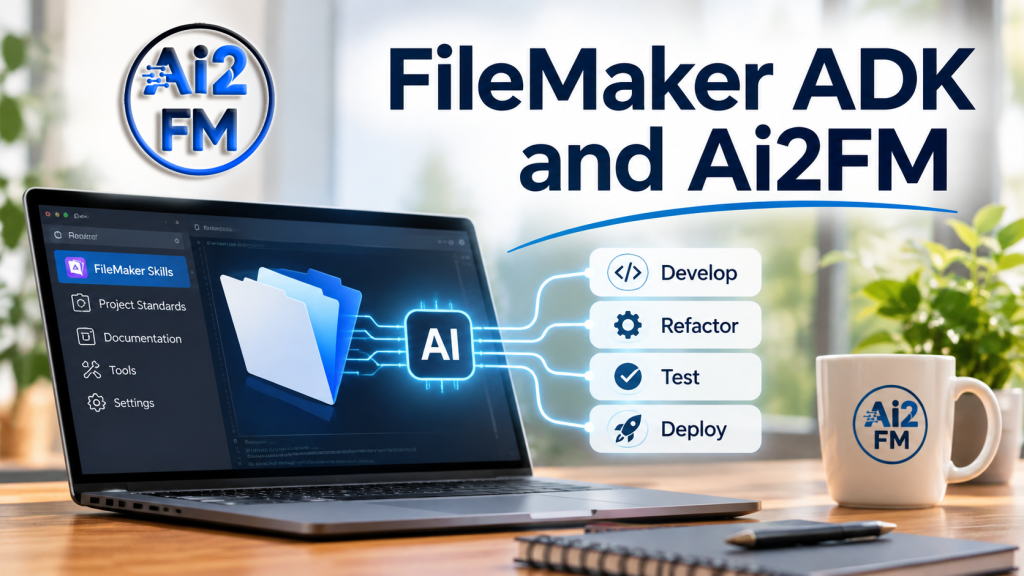
The introduction of Claris FileMaker’s Agentic Development Kit (ADK) marks a significant step forward for the FileMaker platform.
For decades, FileMaker developers have built sophisticated applications using a predominantly graphical development environment. ADK changes that relationship by introducing a programmatic interface through which AI coding agents can inspect, create, and modify FileMaker solutions.
With ADK, an agent can work with tables, fields, relationships, scripts, layouts, and other application components. Through its separate runtime connection, it can also interact with an open FileMaker Pro session to test application behavior.
This is an important development.
But it also raises a fundamental question:
Giving an AI agent access to FileMaker is one thing. Giving it the knowledge and evidence required to produce reliable FileMaker code is another.
That is where ai2fm, the .fmscript language, and the ai2fm Agent Pack enter the picture.
What ai2fm Brings to Agentic Development
The ai2fm.com ecosystem approaches the problem from a different direction.
Rather than beginning with direct access to a FileMaker file, ai2fm began by addressing how FileMaker scripts can be represented, understood, generated, inspected, and transferred between FileMaker and modern development environments.
At the center of this approach is .fmscript, a human-readable, AI-friendly representation of FileMaker scripting, supported by the publicly documented standard at fmscript.org.
This provides a practical bridge between traditional FileMaker scripting and the text-based workflows used by AI coding agents.
The ai2fm Agent Pack, formally described as the ai2fm Corpus for AI Agents, extends that foundation.
It is designed to supply existing coding agents with structured FileMaker scripting knowledge, including:
- Detailed, step-specific documentation and syntax.
- Complete
.fmscriptexamples. - Corresponding FileMaker
.fmp12evidence files. - Supporting fixtures, custom functions, and prerequisites.
- Version-specific information and documented limitations.
- Reproducible material that developers and agents can use to verify expected behavior.
The Agent Pack is not another AI model, and it does not require fine-tuning. It is a maintained knowledge corpus designed for agents to consult when performing FileMaker scripting tasks.
Its purpose is straightforward: give an AI agent reliable reference material instead of requiring it to reconstruct FileMaker scripting behavior from general model knowledge.
ADK and ai2fm: Different Responsibilities, Complementary Capabilities
Consider the distinction:
Claris ADK provides the development interface.
It enables an agent to access and modify actual FileMaker application definitions, using the FileMaker CLI and associated agent integration tools.
ai2fm provides scripting representation and reference knowledge.
It enables FileMaker scripts to be expressed in .fmscript, while its associated documentation and evidence corpus help an agent understand the syntax, prerequisites, and behavior of documented script steps.
An agent equipped with both capabilities can potentially use ai2fm’s reference material to construct or analyze scripts, then use ADK’s development interface to work with the corresponding FileMaker application.
That is a complementary engineering workflow, the two products currently provide a tested, native integration.
Why Reproducible Evidence Matters
AI-generated code can look convincing while being incorrect.
FileMaker scripting introduces additional challenges because script-step options, calculation expressions, version differences, and application context all influence the resulting behavior.
A language model may know that a FileMaker script step exists without knowing its precise syntax, supported options, or limitations.
The ai2fm corpus addresses this by organizing knowledge around actual script-step examples and supporting evidence.
Where the corpus contains applicable material, an agent can consult complete examples, inspect prerequisites, and distinguish documented behavior from assumptions.
This eliminates hallucinations and guarantee correctness. Every script step have complete coverage.
It does, however, provide something essential to engineering: a reference that can be inspected, challenged, and verified.
The Developer Remains Responsible
Neither ADK nor ai2fm removes the need for experienced FileMaker developers.
An agent may generate a script, but it does not automatically understand every business rule, security requirement, architectural decision, or undocumented dependency within an existing solution.
An agent may successfully apply a change through ADK, but that does not prove the change is functionally correct.
Similarly, successful conversion from .fmscript into FileMaker does not establish that the script behaves correctly when executed.
Generation, conversion, execution, and verification are separate stages.
This distinction is central to the ai2fm approach: AI should assist the development process while producing artifacts and results that developers can independently inspect.
Where the ai2fm Agent Pack Stands
The ai2fm Agent Pack has an approved architecture as a separately distributed knowledge package for paying customers.
Its design preserves the existing generated corpus and allows compatible agents to navigate the material through a documented index. The package is also intended to serve as an external help source for the ai2fm extension.
The existing public documentation at fmscript.org remains the reference channel; the separate Agent Pack is intended to provide the complete downloadable examples and supporting evidence.
Two Approaches, One Opportunity
Claris is opening the FileMaker development environment to agentic tools.
ai2fm is making FileMaker scripting more accessible to those same tools through a readable representation, maintained documentation, and reproducible examples.
The opportunity is not merely to generate FileMaker code faster.
It is to make agent-assisted FileMaker development more understandable, inspectable, and verifiable.
With that distinction established, the following tutorial examines how Claris ADK works, what it can do, how its architecture is organized, and the precautions developers should take when allowing AI agents to modify real FileMaker applications.
The technical discussion that follows is based primarily on the November 5, 2026 Claris Community Live demonstration. The ai2fm Agent Pack description reflects its documented architecture and development status.
Understanding, Installing, Configuring, and Using the FileMaker Agentic Development Kit
Chapter 1 — What Are ADT and ADK?
1.1 The naming change
Claris initially developed its agentic technology under the working name ADT — Agentic Development Toolkit.
The official product name is now FileMaker ADK — Agentic Development Kit.
Developers may continue seeing ADT referenced in older previews, repository names, videos, technical material, or early documentation.
For practical purposes:
- ADT = the original working name.
- ADK = the official product name.
- FileMaker CLI = the command-line component installed by ADK.
- Agent plugin = the component that teaches a coding agent how to interact with FileMaker.
- MCP = the integration mechanism used for runtime interaction with FileMaker Pro.
These components are related but are not interchangeable.
1.2 What problem does ADK solve?
Historically, FileMaker development has primarily involved interacting with the FileMaker Pro graphical interface.
Developers create and modify:
- Tables and fields.
- Relationships and table occurrences.
- Scripts and calculations.
- Layouts and themes.
- Value lists.
- Custom menus.
- Security-related application definitions.
Even a highly experienced developer must spend substantial time navigating dialogs, manipulating objects, and performing repetitive changes.
ADK introduces another development mechanism.
A developer expresses the required changes through an AI coding agent. The agent analyzes the request, retrieves relevant FileMaker knowledge, constructs operations, and uses ADK to interact with the application.
The objective is not to remove the developer from the process.
The objective is to change the developer’s role from manually performing every operation to defining, directing, reviewing, and validating the work.
1.3 What ADK is not
ADK is not:
- A standalone large language model.
- A replacement for the FileMaker database engine.
- A replacement for FileMaker Server.
- A guarantee that generated scripts are correct.
- A substitute for application security.
- An automatic production deployment system.
- A guarantee of reversible schema changes.
It is a development integration kit.
This distinction is particularly important because ADK gives an external agent the ability to perform genuine development operations.
Those operations can modify the actual FileMaker file.
Chapter 2 — Understanding the Components
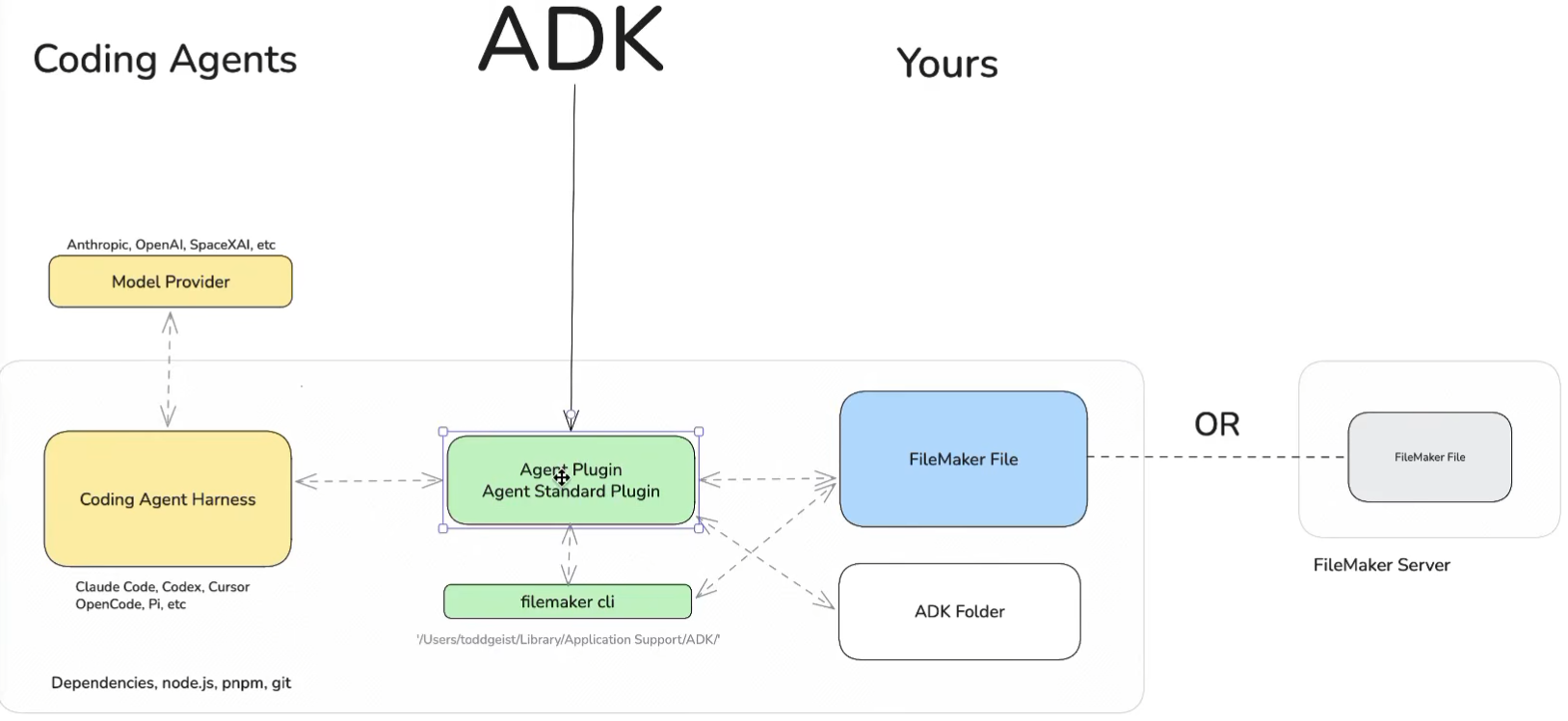
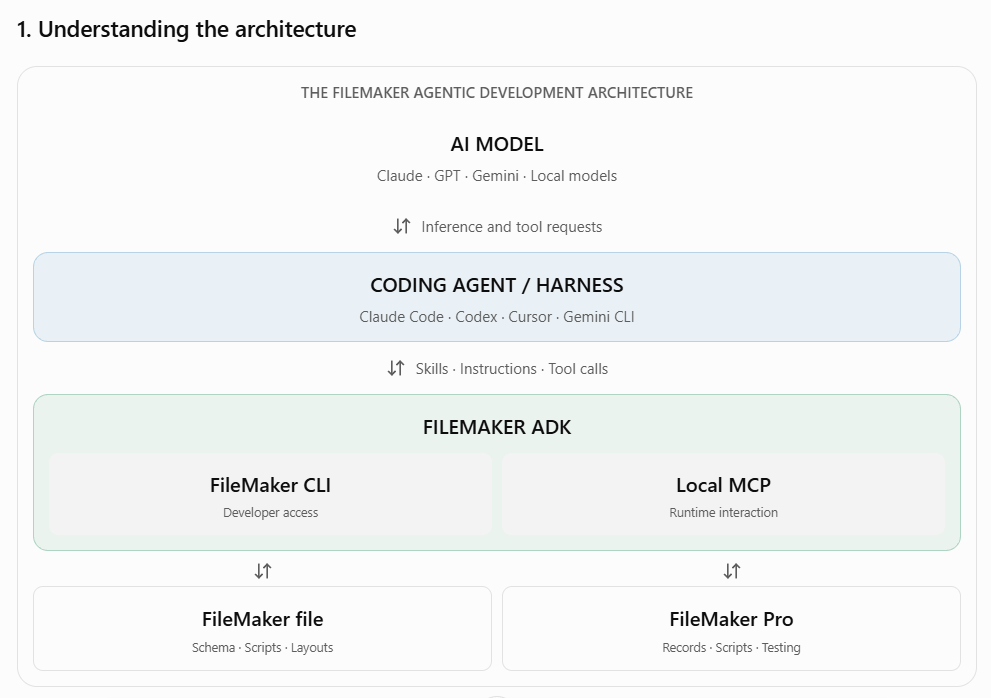
The complete system consists of several cooperating layers.
2.1 Layer 1: The AI model
The model interprets developer instructions, reasons about application structure, and proposes changes.
Examples of model ecosystems include:
- Anthropic Claude.
- OpenAI GPT models.
- Google Gemini.
- Compatible open-weight models.
The model itself does not inherently know how to modify a FileMaker database.
It needs tools and an environment capable of performing those operations.
2.2 Layer 2: The coding agent
The coding agent is the software responsible for orchestrating the interaction between the model and development tools.
Examples discussed during the demonstration included:
- Claude Code.
- OpenAI Codex.
- Cursor.
- Gemini CLI.
- OpenCode.
- Pi.
The coding agent is sometimes called an agent harness.
Its responsibilities may include:
- Maintaining the active development conversation.
- Reading instructions and project context.
- Selecting relevant development skills.
- Invoking external tools.
- Examining results and error messages.
- Planning subsequent operations.
- Iterating until the requested task is completed.
The coding agent is distinct from the model.
The same development environment may support multiple models, depending on the agent’s configuration.
2.3 Layer 3: The ADK agent plugin
The ADK agent plugin supplies FileMaker-specific capabilities to the coding harness.
According to the November demonstration, its components include:
- Agent skills.
- MCP server configuration.
- FileMaker-specific instructions.
- Development workflows.
- FileMaker documentation and Help material.
- Supporting templates.
The bundled FileMaker knowledge is significant.
Without it, the model must rely heavily on its previously learned understanding of FileMaker.
With it, the agent can retrieve product-specific reference information during development.
However, documentation access does not guarantee correct interpretation. Results must still be tested.
2.4 Layer 4: The FileMaker CLI
CLI stands for Command-Line Interface.
This component provides programmatic development access to FileMaker files.
During the demonstration, Claris showed it being used to create and modify application definitions, including:
- Tables.
- Fields.
- Relationships.
- Scripts.
- Layouts.
- Value lists.
- Themes.
- Other development objects.
The CLI allows the agent to interact with the FileMaker file without manually navigating every FileMaker Pro development dialog.
This is the mechanism behind the claimed development speed improvements.
Important: The transcript confirms the CLI’s capabilities but does not provide a complete, authoritative command reference. Do not assume that undocumented command names, parameters, or JSON structures are stable.
2.5 Layer 5: FileMaker Pro and FileMaker Server
ADK interacts with actual FileMaker applications.
The demonstrated architecture supports two primary locations:
Local development
A FileMaker file resides on the development computer and can be accessed through the supported local mechanisms.
Server-hosted development
The FileMaker file resides on a compatible FileMaker Server.
Todd specifically stated that a local file could be accessed with peer-to-peer sharing enabled.
He also demonstrated interactions with FileMaker Pro directly.
A local development setup therefore does not necessarily mean that the CLI operates exclusively against a closed file.
In fact, Todd stated that the CLI can operate on closed files, but that an open FileMaker Pro session is desirable for many workflows.
Chapter 3 — The Two Connection Architecture
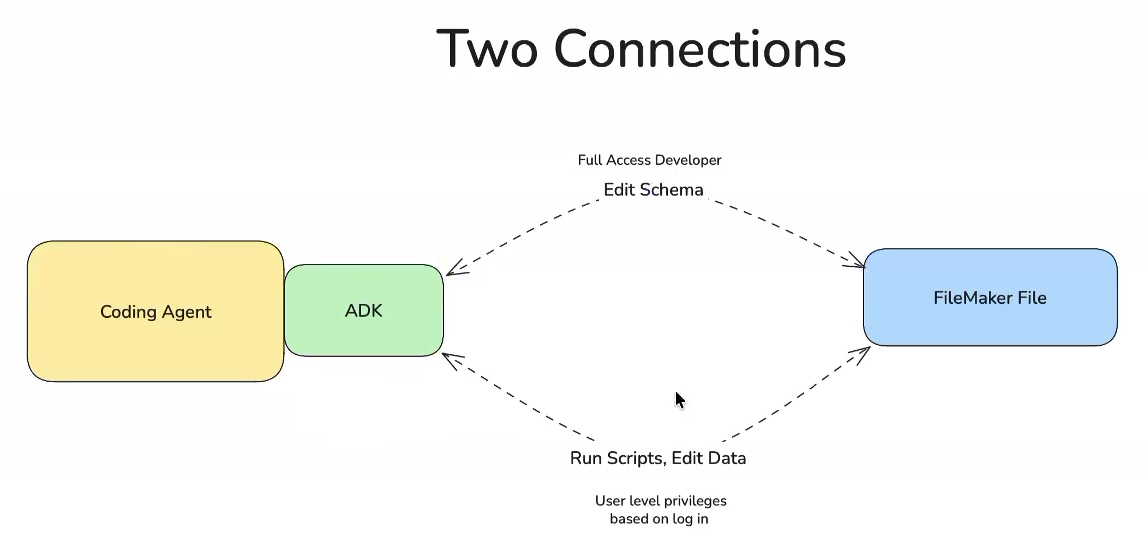
This is arguably the most important technical concept in ADK.
ADK uses two distinct connections with different purposes.
3.1 Connection A: Developer access through the CLI
The CLI connects to the FileMaker file using a Full Access account.
This connection allows structural modifications.
Examples:
- Create a table.
- Modify a field.
- Add a script.
- Change a layout.
- Create a relationship.
- Update a theme.
These are development operations.
The Full Access account is necessary because an agent must have appropriate permissions to modify the application definition.
An important consequence is that the agent possesses powerful capabilities.
A malformed or misunderstood instruction may result in real application changes.
3.2 Connection B: Runtime access through FileMaker Pro
The second connection allows interaction with an open FileMaker Pro session through the local MCP integration.
Its purpose is different.
Rather than exclusively modifying the application definition, it allows the agent to interact with the running application.
Examples include:
- Read records.
- Create sample records.
- Execute scripts.
- Test application behavior.
- Verify access restrictions.
- Observe results under a particular privilege set.
Claris explained that this connection can use whichever FileMaker account is currently selected for testing.
That allows an important scenario.
3.3 Example: Testing Sales department privileges
Suppose a CRM application has two account types:
Developer
- Full Access.
- Can edit schema.
- Can modify scripts.
- Can inspect all relevant application definitions.
Sales representative
- Restricted privilege set.
- Can modify assigned customer records.
- Cannot access administrative data.
- Cannot change the application definition.
The agent initially connects through the CLI with Full Access credentials.
The developer then opens the application in FileMaker Pro as a Sales representative.
The agent can continue modifying the application through its developer connection while using the runtime connection to test the behavior visible to the Sales account.
For example:
- The agent creates a script named
UpdateCustomerStatus. - It adds a button to a customer layout.
- It verifies that the script exists.
- The developer opens FileMaker Pro using the Sales privilege set.
- The agent tests the intended behavior through that session.
- It observes whether the operation succeeds or fails.
- It reports the results.
This separates the ability to implement functionality from the permissions under which that functionality must operate.
3.4 Why this matters
Many application bugs are not obvious when testing with Full Access.
Typical examples include:
- Scripts that work for developers but fail for ordinary users.
- Layout objects accessing restricted fields.
- Record creation failing under a limited privilege set.
- Navigation scripts accessing unavailable layouts.
- Calculations behaving differently under restricted access.
- Errors caused by missing extended privileges.
The two-connection design provides a foundation for automated privilege-aware testing.
However, an agent reporting that a test succeeded is not by itself sufficient proof.
A robust workflow should verify the resulting data, permissions, and visible behavior independently.
Chapter 4 — Installation and System Requirements
4.1 Availability as of November 2026
Claris demonstrated ADK in a developer-preview environment.
The November 5 session announced plans for broader preview availability in December 2026.
The demonstrated environment was primarily macOS-based.
Windows support was explicitly discussed as forthcoming.
Therefore, installation instructions must distinguish between the preview shown in the presentation and the eventual public installer.
4.2 Required components
Todd identified the following prerequisites:
| Component | Purpose |
|---|---|
| FileMaker Pro | Application development and runtime testing |
| FileMaker Server | Optional hosted development environment |
| ADK | FileMaker agent integration |
| Coding agent | Executes AI-assisted development workflows |
| Node.js | JavaScript runtime dependency |
| pnpm | Package management |
| Git | Version control for applicable project files |
| AI model/provider | Provides reasoning and code-generation capabilities |
The presentation did not establish exact minimum versions of Node.js or pnpm.
Use the requirements published with the actual ADK release being installed.
4.3 Verify basic dependencies
On macOS or Windows, a terminal can be used to verify the availability of common dependencies.
node --version
pnpm --version
git --versionThese commands are general dependency checks, not ADK installation commands.
If a command is not recognized, its corresponding dependency may need to be installed or made available through the system path.
4.4 Install a supported coding agent
Choose an agent supported by the available ADK preview.
The demonstration used Claude Code.
Other harnesses were identified as compatible through their respective integration mechanisms.
Compatibility depends on the agent’s support for the required skills and tools.
Do not assume every AI chat interface is automatically a compatible development harness.
4.5 Install ADK
Obtain the installer and installation instructions from Claris’s authorized distribution channel.
During the demonstration, Todd explained that installation adds the FileMaker CLI and the agent integration components.
The installer detects or configures supported agent environments.
After installation, restart the coding agent so it can discover the newly installed components.
4.6 Verify the installation
A practical verification procedure is:
- Start the supported coding agent.
- Open its FileMaker skills interface.
- Confirm that ADK-related skills are available.
- Create a disposable development project.
- Run the supported ADK project setup workflow.
- Verify that the agent can identify the available FileMaker connection mechanisms.
- Confirm successful authentication with a test file.
Do not begin verification against a production solution.
Chapter 5 — Creating an ADK Project Folder
5.1 Why a project folder is necessary
Traditional FileMaker development is often centered around one or more .fmp12 files.
Agentic development introduces another important concept: the development workspace.
Coding agents require a filesystem context.
They use this context to discover:
- Instructions.
- Source files.
- Configuration.
- Project resources.
- Standards.
- Version-control metadata.
- Web application code.
The ADK project folder becomes the working environment for the agent.
5.2 Recommended example structure
The following is an illustrative organization, not a guaranteed installer-generated directory tree.
CRM-Development/
│
├── AGENTS.md
├── CRM.fmp12
│
├── docs/
│   ├── requirements.md
│   ├── architecture.md
│   └── test-plan.md
│
├── standards/
│   ├── naming.md
│   ├── scripting.md
│   └── security.md
│
├── web/
│   └── ...
│
└── .git/The actual ADK setup may create additional hidden directories and configuration files.
Todd showed configuration and standards artifacts being created automatically.
5.3 Does the FileMaker file have to live in this folder?
No.
The transcript explicitly states that the FileMaker file may reside elsewhere.
For example:
- In the project folder.
- In another local location.
- On a FileMaker Server.
The project folder defines the coding agent’s workspace, not necessarily the physical location of the FileMaker database.
5.4 Trusting the project folder
Coding agents commonly ask whether the developer trusts the selected directory.
This is a security decision.
Granting workspace access allows the coding agent to interact with files and execute permitted operations according to its configuration.
Todd explained that the agent normally operates within the selected workspace but can be directed to access other folders.
This should not be interpreted as an operating-system-enforced sandbox.
The effective boundary depends on the coding agent, its tool permissions, and the operating-system account under which it runs.
Engineering recommendation: Treat the agent workspace as a development trust boundary, but enforce sensitive restrictions using actual filesystem permissions and tool controls.
Chapter 6 — AGENTS.md and Persistent Project Instructions
6.1 What is AGENTS.md?
AGENTS.md is a Markdown file used by compatible coding agents to obtain persistent project instructions.
The relevant file is read when the coding agent initializes or loads the project context.
Its purpose is to provide rules and information that should remain applicable across development sessions.
6.2 What belongs in AGENTS.md?
Typical content includes:
- Application purpose.
- Development constraints.
- Naming standards.
- Architectural decisions.
- Security requirements.
- Testing procedures.
- Prohibited operations.
- Documentation requirements.
6.3 Example AGENTS.md
# CRM Development Instructions

## Environment

This project is a development environment.

Never connect to production without explicit
authorization.

## Development rules

1. Inspect existing objects before modifying them.
2. Preserve existing business logic unless changes
   are explicitly requested.
3. Never delete scripts or fields without approval.
4. Use established naming conventions.
5. Avoid introducing unnecessary dependencies.

## Scripts

- Prefer small, focused scripts.
- Separate client and server execution paths.
- Preserve error handling.
- Document script parameters.
- Do not silently suppress errors.

## Security

- Never expose credentials in source files.
- Never use real customer data for AI experiments.
- Verify behavior under restricted privilege sets.

## Validation

Before applying changes:

1. Explain the proposed modifications.
2. Identify affected objects.
3. Perform available validation or dry-run checks.
4. Report results.

After applying changes:

1. Verify the modified objects.
2. Run relevant tests.
3. Report any unresolved issues.This is an example of a developer-authored policy, not an official Claris standards file.
6.4 Why persistent instructions matter
An AI model may behave differently between sessions.
It may also lose details as a conversation grows and earlier information is compressed.
Persistent project instructions help reduce that inconsistency.
However, instructions do not provide deterministic enforcement.
If a restriction is critical, it should also be enforced through permissions, isolated environments, review procedures, or automated validation.
Chapter 7 — The FileMaker Standards Pack
7.1 What is the standards pack?
The standards pack is one of the more important features shown in the demonstration.
It lets developers define how applications should be structured and named.
Rather than relying on the model’s default conventions, the developer can establish explicit project rules.
7.2 What standards can be defined?
Examples include:
- Table naming.
- Field naming.
- Primary-key conventions.
- Foreign-key conventions.
- Singular versus plural table names.
- Relationship naming.
- Global-field organization.
- Script naming.
- Layout naming.
- Table-occurrence conventions.
- Relationship graph organization.
7.3 How Claris demonstrated standards creation
Todd activated the FileMaker development standards skill.
He then instructed the agent to question him about his development preferences.
The agent asked questions such as:
- Should the standards apply to this project only?
- Should they be reusable across projects?
- What naming convention should tables follow?
- Should table names be singular or plural?
- Should table names use prefixes?
- How should keys be represented?
- Where should global fields be stored?
The agent used his responses to generate standards files.
7.4 Example standards definition
# CRM Naming Standards

## Tables

Use singular names.

Examples:
- Customer
- Contact
- Opportunity
- Invoice

## Primary keys

Use a consistent primary-key field.

Example:
Customer::CustomerID

## Foreign keys

Use names identifying the referenced entity.

Example:
Opportunity::CustomerID

## Globals

Store application-level global fields in
the Globals table.

## Relationships

Use the anchor-buoy pattern.

## Scripts

Use descriptive verb-based script names.

Examples:
- CreateCustomer
- UpdateCustomer
- ValidateOpportunityThe naming choices above are illustrative.
Your standards pack should reflect the conventions of your own application, not automatically adopt Todd’s preferences.
7.5 Project-specific versus global standards
Todd described two deployment options.
Project-specific standards
The standards are stored within the relevant project configuration.
They can be shared with team members working on that project.
Global standards
The standards are placed in the coding agent’s user-level configuration directory.
They can then be available across multiple projects on the same computer.
The demonstrated storage mechanism depends on the selected coding harness.
7.6 Deriving standards from an existing application
ADK can be asked to inspect an existing FileMaker file and infer its conventions.
Example instruction:
Inspect the connected FileMaker solution. Identify existing naming conventions for tables, fields, relationships, scripts, and layouts. Report inconsistencies and ask me questions before producing a proposed standards pack. Do not modify the application.
This is particularly valuable for legacy applications developed by multiple people over many years.
However, automatically inferred patterns should be reviewed.
An existing inconsistency may represent an intentional exception rather than an error.
Chapter 8 — Creating a FileMaker Application with ADK
8.1 The CRM demonstration
Todd demonstrated an end-to-end CRM creation workflow.
He reported completing the example in approximately 35 minutes during a single coding-agent session.
The application included:
- Tables and fields.
- Relationships.
- An anchor-buoy relationship graph.
- Value lists.
- Script-related layouts.
- API layouts.
- Native FileMaker layouts.
- A customized theme.
- Generated sample data.
- Responsive web-viewer interfaces.
This was a demonstration result, not a controlled productivity benchmark.
8.2 Step 1: Create an empty development file
The first task is to create or select a FileMaker application.
Example instruction:
Create a new FileMaker development application named CRM.fmp12 inside the project workspace. Use the supported ADK workflow and report the resulting file and connection status.
Todd also specified an extended privilege during his demonstration.
The transcript does not establish the complete configuration syntax or the exact final privilege settings.
Use the ADK documentation to select the required extended privileges for your environment.
8.3 Step 2: Initialize the ADK project
After creating the file, Todd invoked the project setup skill.
The agent then created or populated project support files.
Example instruction:
Initialize this directory as a FileMaker ADK development project. Connect to CRM.fmp12 using the supported setup workflow. Show me the generated configuration and confirm that the development connection is operational.
8.4 Step 3: Establish naming conventions
Before building the database structure, run the standards workflow.
Example:
Configure the FileMaker development standards for this project. Ask me about naming, keys, relationships, scripts, layouts, and globals before generating the standards files.
Do not skip this step when building a long-lived application.
Retrofitting standards after hundreds of objects have been generated creates unnecessary changes and risk.
8.5 Step 4: Define the data model
A generic CRM could contain:
| Table | Purpose |
|---|---|
| Customer | Companies or organizations |
| Contact | Individuals associated with customers |
| Opportunity | Potential sales |
| Activity | Calls, meetings, and follow-ups |
| Product | Products or services |
| OpportunityLine | Products associated with opportunities |
The developer should specify:
- Primary keys.
- Foreign keys.
- Data types.
- Required fields.
- Validation rules.
- Auto-enter behavior.
- Relationships.
- Business constraints.
Example instruction:
Using our approved naming standards, propose the database schema for a small CRM containing Customers, Contacts, Opportunities, Activities, and Products. Present all tables, fields, relationships, and assumptions for approval. Do not write changes until the design is accepted.
8.6 Step 5: Apply the schema
Once the design is accepted, ask the agent to create the definitions.
The demonstrated ADK workflow supports validation before changes are committed.
Todd referred to this as a dry run.
The agent submits or validates proposed modifications and receives meaningful feedback if a requested change cannot be applied.
The demonstrated system can then revise the request based on the returned errors.
Example instruction:
Apply only the approved schema changes. Use the available dry-run validation first. Stop if validation identifies unexpected modifications. After applying, read back the schema and compare it against the approved specification.
8.7 Step 6: Create relationships
Todd demonstrated the agent creating an anchor-buoy relationship graph.
The initial arrangement was functional but not satisfactory.
He supplied a screenshot and requested a more conventional visual organization.
The agent then reorganized the graph.
This illustrates the importance of visual review.
Generating valid relationships and arranging the relationship graph for maintainability are separate tasks.
An appropriate instruction is:
Arrange the relationship graph using our anchor-buoy conventions. Keep related table occurrences grouped consistently. Preserve all relationship semantics. Provide a before-and-after inventory of changes.
8.8 Step 7: Create layouts
The demonstration included several layout categories.
Native application layouts
These are regular FileMaker layouts containing native objects.
Script utility layouts
These support script execution and access to relevant table contexts.
API layouts
These expose the fields needed for the application’s web UI integration.
The demonstration should not be interpreted as establishing that every FileMaker operation requires an API layout.
The appropriate layouts depend on the design and integration mechanism.
8.9 Step 8: Create value lists and application components
Todd asked the agent to create value lists after the core database structure was in place.
At this point, an agent can also be instructed to work on individual scripts or user-interface components.
Use small, reviewable units of work rather than requesting uncontrolled application-wide changes.
Chapter 9 — Native FileMaker Layout Development
9.1 Can ADK build native layouts?
Yes.
Todd explicitly stated that ADK can build native FileMaker layouts.
The demonstration included native list and detail layouts.
These were not simply external HTML pages presented in a browser.
9.2 Why native layouts still matter
Native layouts provide direct access to traditional FileMaker capabilities.
They remain appropriate for applications where developers depend on:
- Existing FileMaker interface patterns.
- Native objects.
- Established keyboard workflows.
- FileMaker layout triggers.
- Existing scripts and navigation.
- FileMaker Go and desktop interactions.
ADK does not require migration to web viewers.
9.3 Visual inspection
The agent can use screenshot and computer-use capabilities when supported by the selected coding harness.
For example, a developer can ask:
Inspect the current FileMaker layout. Identify incorrectly aligned objects in the portal rows. Propose adjustments without changing data bindings or script triggers.
This allows the agent to combine structural development tools with visual feedback.
9.4 Limitations
Visual inspection is not equivalent to complete application testing.
A layout may appear correct while containing:
- Incorrect field bindings.
- Wrong button actions.
- Missing script triggers.
- Improper tab order.
- Incorrect object visibility calculations.
- Privilege-dependent errors.
Consequently, screenshot testing should be combined with structural inspection and runtime validation.
Chapter 10 — Web Viewer Application Development
10.1 The alternative UI model
ADK can also be used to construct HTML, CSS, and JavaScript interfaces displayed within FileMaker web viewers.
Todd showed a CRM interface with:
- Responsive layouts.
- List and detail views.
- Custom styling.
- Light mode.
- Dark mode.
- System appearance support.
10.2 Why web viewers offer greater flexibility
Native FileMaker layouts have a defined set of layout objects and styling capabilities.
Web technologies offer access to a substantially broader interface ecosystem.
Examples include:
- Responsive cards.
- Dashboards.
- Custom charts.
- Interactive calendars.
- Gantt charts.
- Advanced navigation components.
- Flexible typography.
- Mobile-oriented layouts.
The demonstration used a design approach based on shadcn-style components and theme presets.
10.3 How the demonstrated workflow operated
Todd first created a design reference.
He selected colors, typography, and component styling.
He then supplied screenshots or a theme preset to the coding agent.
The agent used those references to generate the web-viewer interface.
10.4 Example workflow
- Define the intended user experience.
- Select or create a visual theme.
- Provide screenshots or design specifications.
- Identify the FileMaker data and scripts the interface requires.
- Ask the agent to build the interface.
- Preview the result.
- Identify visual or functional defects.
- Request targeted corrections.
- Test the interface within FileMaker Pro.
- Test the deployment clients that the application must support.
10.5 Example prompt
Build a responsive CRM contact-list interface for a FileMaker web viewer. Use the approved design theme and existing application fields. Include searching, record selection, and a detail panel. Do not invent field names or business rules. Explain every FileMaker integration point.
10.6 Editing the interface visually
Todd demonstrated selecting a component in a preview and describing the desired change.
For example, he requested a light-pink color for a selected card.
The coding agent could use the highlighted component as context for modifying its source code.
He also demonstrated the concept of annotating interface screenshots to communicate required corrections.
10.7 An important engineering qualification
Todd argued that developers can create sophisticated web interfaces without needing to read every line of generated code.
That may be sufficient for some prototypes.
For production systems, the engineer still needs a maintainable way to understand and verify:
- Authentication and authorization.
- Data access.
- Input validation.
- Script execution.
- Error handling.
- Resource loading.
- JavaScript dependencies.
- Injection risks.
- Client compatibility.
A working visual interface is only one part of a production application.
Chapter 11 — AI-Assisted Script Analysis and Refactoring
11.1 Working with existing applications
ADK is not restricted to new solutions.
Todd described the ability to connect an agent to an existing FileMaker application and improve its scripts.
He referenced demonstrations by Ernest Koe involving legacy FileMaker code and the discovery of defects in existing scripts.
11.2 Recommended analysis-first workflow
For a production-derived development copy:
- Connect to the development clone.
- Identify the target script.
- Retrieve the script definition.
- Identify referenced scripts and dependent fields.
- Analyze the control flow.
- Identify potential defects.
- Report findings with evidence.
- Propose corrections.
- Obtain approval.
- Apply only approved changes.
- Run regression tests.
11.3 Example analysis prompt
Analyze the script
ProcessCustomerOrderwithout modifying it. Identify all called scripts, variables, parameters, field dependencies, error-handling branches, privilege assumptions, and potential failure paths. Distinguish confirmed defects from suspected defects. Provide a proposed test for each finding.
11.4 Example refactoring prompt
Refactor the approved sections of
ProcessCustomerOrderwhile preserving its observable behavior. Do not alter transaction boundaries, error codes, logging, privilege assumptions, or downstream script parameters. Validate the changes before applying them and provide a comparison afterward.
11.5 Why dependency analysis matters
A FileMaker script rarely operates in isolation.
It may depend on:
- Other scripts.
- Current layout context.
- The active found set.
- Global variables.
- Global fields.
- Relationships.
- Script triggers.
- Privilege sets.
- Server versus client execution.
- Plug-in functions.
A syntactically valid modification may still break the application.
This is why regression testing and dependency analysis remain necessary.
Chapter 12 — Dry Runs, Errors, and Change Validation
12.1 What the dry-run mechanism does
Todd described a development workflow in which the agent attempts to validate proposed changes before committing them.
The system returns diagnostic feedback.
For example, if the agent refers to a field that has been renamed, the returned error may help it determine why the operation failed.
The agent can then revise the planned changes.
12.2 What dry-run success actually proves
A successful dry run indicates that the proposed operations passed the validation performed by that mechanism.
It does not necessarily establish:
- Correct business logic.
- Correct security behavior.
- Correct user-interface behavior.
- Absence of side effects.
- Performance acceptability.
- Compatibility with all deployment clients.
12.3 Recommended validation sequence
Phase A — Static analysis
Inspect the target objects and dependencies.
Phase B — Proposed change review
Produce a list of objects to be created, modified, or removed.
Phase C — Dry run
Use the available validation mechanism.
Phase D — Apply
Execute the approved changes.
Phase E — Read back
Retrieve the resulting application definitions and compare them with the intended changes.
Phase F — Runtime testing
Run the relevant application tests.
Phase G — Regression testing
Verify that existing features still operate correctly.
12.4 Do not confuse dry runs with transactions
The demonstration does not establish that every ADK modification is covered by a single atomic transaction.
It also does not establish that arbitrary multi-step changes can always be reversed automatically.
Avoid making those assumptions.
Chapter 13 — Concurrent Development and Locking
13.1 The agent behaves like another developer
Todd explained that an ADK agent modifying a hosted FileMaker solution behaves similarly to another developer accessing the same file.
When one session is modifying a development object, another session may encounter the corresponding development lock.
13.2 Example: Relationship graph editing
Suppose an agent is modifying the relationship graph.
At the same time, a developer opens Define Database and attempts to make conflicting changes.
The agent and developer may block one another.
This is comparable to ordinary multi-developer contention.
13.3 Why agents can reduce lock duration
Todd explained that an agent can prepare a set of changes before applying them.
Rather than manually opening dialogs and editing every object one at a time, it may submit a batch of operations.
This can reduce the time spent holding certain development locks.
However, the exact locking behavior depends on the operation and the FileMaker environment.
13.4 Recommended team practice
Assign ownership of development tasks.
Avoid overlapping schema modifications by multiple agents or developers.
Use an isolated development environment for large structural changes.
Record when changes are being applied and which components are affected.
Do not assume that faster execution eliminates concurrency risks.
Chapter 14 — Version Control and Git
14.1 What Git can track
Todd demonstrated that ADK project folders can be initialized as Git repositories.
Git can track appropriate filesystem-based artifacts, including:
- Web application source code.
- Markdown documentation.
- Development instructions.
- Standards files.
- Configuration files that do not contain secrets.
- Other supported text-based resources.
14.2 The important limitation
A FileMaker .fmp12 application is not equivalent to a directory of ordinary source files.
Todd explicitly distinguished the FileMaker file from the web code when discussing Git tracking.
Therefore, do not assume that Git provides line-by-line, source-level version control or automatic rollback for every change inside an .fmp12 file.
14.3 Recommended repository contents
CRM-Development/
├── AGENTS.md
├── docs/
├── standards/
├── web/
├── tests/
└── .gitignoreThe exact structure depends on the ADK release and agent harness.
14.4 FileMaker application backups
Maintain separate, recoverable application snapshots.
For example:
Backups/
├── CRM_before_schema_change.fmp12
├── CRM_after_schema_change.fmp12
└── CRM_release_candidate.fmp12These names illustrate a backup strategy.
Do not depend on Git alone to recover an incorrectly modified FileMaker solution.
Chapter 15 — Undo, Rollback, and Recovery
15.1 Can an agent undo its changes?
Todd stated that the agent can often reconstruct and reverse previously performed operations.
However, he also acknowledged that the engine does not provide an equivalent of a universal, step-by-step undo stack for every operation.
This is a critical distinction.
An agent may be able to perform a reverse modification, but that is not necessarily equivalent to restoring the previous application state.
15.2 Example: Why reverse modifications are insufficient
Suppose an agent:
- Deletes a field.
- Changes dependent calculations.
- Modifies several scripts.
- Creates replacement relationships.
Asking it to reverse the changes may produce another set of modifications.
It does not necessarily guarantee complete recovery of deleted data, prior definitions, or all related application behavior.
15.3 Recommended recovery model
Use three levels of protection.
Level 1: Reviewable operations
Require a clear description of changes before execution.
Level 2: Application snapshots
Take a known-good backup before structural modifications.
Level 3: Recovery testing
Periodically verify that backups can actually be restored and opened.
The availability of AI-generated reverse operations should be treated as a convenience, not the primary disaster-recovery mechanism.
Chapter 16 — Security, Credentials, and Data Privacy
16.1 Full Access is a privileged security boundary
The development connection uses a Full Access FileMaker account.
Consequently, the ADK workflow should be treated as privileged administrative activity.
A compromised or misdirected coding agent could potentially perform damaging operations.
16.2 Use dedicated development environments
Claris repeatedly emphasized that developers should avoid starting their ADK experiments on live production systems.
The safest initial workflow is:
- Create a new disposable file.
- Learn the connection and development mechanisms.
- Clone an existing application.
- Populate it with synthetic data.
- Perform development operations on that copy.
- Validate the resulting changes.
- Promote changes through an established deployment process.
16.3 Data sent to model providers
When a cloud AI model is used, relevant project context and tool results may be transmitted to the model provider.
The exact information transmitted depends on the agent and its configuration.
Potentially sensitive information includes:
- Application schema.
- Script logic.
- Field names.
- Business rules.
- Customer information.
- Record contents.
- Authentication-related configuration.
Using a clone with synthetic data reduces the risk of exposing live business records.
It does not automatically eliminate intellectual-property or configuration disclosure risks.
16.4 Dedicated credentials
A dedicated development account can help separate agent access from ordinary administrative activity.
Consider:
- Unique credentials.
- Appropriate logging.
- Restricted environment scope.
- Secure credential storage.
- Credential rotation.
- Controlled access to production servers.
16.5 Local models
Todd confirmed that open-weight models may be used through compatible agent environments.
A developer could therefore investigate configurations involving locally hosted models.
For example:
Local coding agent
       |
Local model endpoint
       |
FileMaker ADK
       |
Development FileMaker applicationThis creates the possibility of an environment where inference is performed locally.
However, local inference does not automatically guarantee that all data remains local.
The complete agent stack must be audited for external network calls, telemetry, plug-in behavior, and dependencies.
16.6 Workspace security
The agent’s project folder is not automatically a hardened sandbox.
The permissions of the operating-system account and the coding agent’s tools remain important.
Treat instructions such as “do not access another folder” as procedural controls unless technical enforcement has been verified.
16.7 Prompt-injection risks
An agent may encounter untrusted information through:
- Database records.
- External documentation.
- Web pages.
- Repository files.
- Retrieved messages.
- Third-party source code.
Such information may contain malicious instructions.
Treat retrieved content as data, not as authorization to execute new operations.
For high-impact changes, enforce approval through the agent’s actual tool permissions.
Chapter 17 — Developing Against Legacy Applications
17.1 Start with discovery
For an existing FileMaker application, begin by establishing its current architecture.
The agent should identify:
- Tables and relationships.
- Script inventory.
- Main navigation paths.
- Privilege sets.
- External dependencies.
- Plug-ins.
- Server-side workflows.
- Critical calculations.
- Existing development conventions.
17.2 Avoid immediate mass refactoring
A broad instruction such as “clean up the entire application” is difficult to validate.
Instead, select a bounded task.
Examples:
- Analyze one critical script.
- Document one module.
- Identify unused objects.
- Audit one privilege-sensitive workflow.
- Improve a single layout.
- Standardize a clearly defined group of scripts.
17.3 Establish a baseline
Before modifying a legacy system, record:
- Existing behavior.
- Known bugs.
- Expected outputs.
- Current performance.
- Dependent scripts.
- User roles affected.
- Available regression tests.
The baseline allows developers to distinguish an intended correction from an unintended behavior change.
Chapter 18 — Moving ADK Changes into Production
18.1 ADK does not replace deployment engineering
Todd explicitly recommended the existing FileMaker development and deployment approach.
Maintain separate development and production environments.
Preferably, include a staging environment.
18.2 Recommended environment structure
DEVELOPMENT
    |
    | Build and validate
    v
STAGING
    |
    | Test migration and regression
    v
PRODUCTION18.3 The data migration model
Todd described a deployment process using the FileMaker Data Migration Tool or an appropriate community alternative.
The general workflow is:
- Make structural changes in the development application.
- Test the application.
- Produce an appropriate clone of the updated application.
- Prepare the deployment environment.
- Migrate the relevant production data into the updated application structure.
- Validate the resulting file.
- Complete the controlled production cutover.
The exact migration procedure depends on the application architecture and the migration tool.
18.4 Important deployment considerations
Before deployment, verify:
- Full and recoverable backups.
- File and schema compatibility.
- External file references.
- Authentication configuration.
- External data sources.
- Plug-in dependencies.
- Container data.
- Global and startup behavior.
- Scheduled server scripts.
- Client compatibility.
- Migration validation.
- Rollback procedure.
18.5 Why this remains essential
ADK can accelerate the creation of changes.
It does not eliminate the risk of deploying incorrect application logic.
In fact, the ability to produce larger changes more quickly may increase the importance of disciplined validation.
Chapter 19 — A Practical ADK Development Exercise
This exercise combines the major capabilities demonstrated during Community Live.
Objective
Create a simple CRM in an isolated development environment.
Phase 1: Prepare the environment
- Install the supported dependencies.
- Install the supported coding agent.
- Install the authorized ADK preview.
- Create an empty workspace.
- Confirm access to a disposable FileMaker file.
Acceptance condition: The coding agent can discover the ADK development capabilities.
Phase 2: Establish project rules
Create an AGENTS.md file and generate a project standards pack.
Acceptance condition: The agent can describe the standards it is expected to follow.
Phase 3: Design the schema
Define the Customer, Contact, and Opportunity tables.
Specify keys, relationships, and validation rules.
Acceptance condition: The agent produces a schema proposal that can be reviewed before implementation.
Phase 4: Create the database structure
Apply the approved schema through the ADK development connection.
Acceptance condition: The resulting FileMaker definitions match the accepted specification.
Phase 5: Create a native interface
Build a customer list and detail layout.
Acceptance condition: The layouts display the intended fields and support the required navigation.
Phase 6: Generate test data
Create synthetic customer and contact records.
Acceptance condition: The records are internally consistent and use no real customer information.
Phase 7: Create scripts
Build simple creation, update, and validation workflows.
Acceptance condition: The scripts produce the expected outputs and handle anticipated failures.
Phase 8: Test permissions
Configure a restricted test account.
Open the solution in FileMaker Pro using that account.
Acceptance condition: Permitted actions succeed and prohibited actions fail.
Phase 9: Create an optional web-viewer interface
Use a chosen design preset.
Acceptance condition: The web viewer displays and manipulates the intended records correctly, subject to the approved application security rules.
Phase 10: Record and review the outcome
Document:
- Created objects.
- Modified objects.
- Test results.
- Open issues.
- Known limitations.
- Source files.
- Backups.
This exercise should provide a foundation for progressively more complex development.
Chapter 20 — Troubleshooting ADK
Problem: The agent cannot find the FileMaker skills
Possible causes:
- ADK installation incomplete.
- Agent not restarted.
- Unsupported coding harness.
- Plugin configuration not discovered.
- Incorrect project environment.
Recommended action:
Verify the authorized installation procedure and restart the agent.
Problem: The CLI cannot modify a FileMaker file
Possible causes:
- Insufficient access privileges.
- Incorrect connection configuration.
- Unsupported FileMaker version.
- Another developer holding an incompatible lock.
- File accessibility problem.
Recommended action:
Verify the connection and Full Access credentials. Check for development contention.
Problem: Runtime interaction fails
Possible causes:
- FileMaker Pro not open.
- Wrong file open.
- MCP connection not authorized.
- Runtime connection not established.
- Inappropriate privilege set.
Recommended action:
Open the intended development file and explicitly verify the runtime connection.
Todd demonstrated an authorization prompt when allowing the agent to interact with FileMaker Pro.
Problem: The agent uses incorrect field names
Possible causes:
- Outdated context.
- Schema changed during the session.
- Ambiguous instructions.
- Incorrect assumptions.
- Incomplete dependency information.
Recommended action:
Ask the agent to retrieve the current schema rather than infer names from memory.
Problem: Layout looks correct but does not work
Possible causes:
- Incorrect bindings.
- Missing scripts.
- Wrong layout context.
- Restricted privileges.
- Broken web-viewer integration.
Recommended action:
Test functionality independently of appearance.
Problem: The agent claims the change succeeded, but behavior is wrong
Possible causes:
- Incomplete testing.
- Incorrect success criteria.
- Faulty assumptions.
- Unhandled edge cases.
Recommended action:
Read back the resulting application definitions and run an independently defined acceptance test.
Chapter 21 — What Has Been Demonstrated and What Remains Unverified?
| Capability | November 2026 evidence |
|---|---|
| ADT renamed to ADK | Explicitly confirmed |
| CLI reads and writes FileMaker definitions | Demonstrated and explained |
| Native layout generation | Demonstrated |
| Relationship graph generation | Demonstrated |
| Standards-pack generation | Demonstrated |
| Web-viewer generation | Demonstrated |
| Synthetic record creation | Demonstrated |
| Local MCP runtime connection | Explained and demonstrated |
| Privilege-aware runtime testing architecture | Explained |
| Git tracking for web and project files | Explained |
| Universal, atomic undo | Not established |
| Automatic production deployment | Not established |
| Guaranteed correctness of generated code | Not established |
| Complete Windows release support | Announced as forthcoming |
| Exact stable CLI command reference | Not provided in the transcript |
| Public preview availability | Planned for December 2026 |
This distinction is important.
Demonstrated capabilities can be studied and evaluated.
Unverified capabilities should not be incorporated into production architecture as established facts.
Chapter 22 — Recommendations for Experienced FileMaker Developers
An experienced developer should approach ADK as an additional development interface, not as an alternative to understanding FileMaker.
The most valuable initial applications are likely to include:
Application discovery
Use the agent to map existing solution structures and dependencies.
Documentation
Generate technical documentation from inspected application definitions.
Legacy code review
Examine scripts and identify candidate defects or maintenance problems.
Repetitive development
Automate routine creation of fields, layouts, scripts, and other consistently structured objects.
Standards enforcement
Use approved naming and architectural rules to improve consistency.
Testing
Build repeatable tests that compare expected and actual application behavior.
Interface prototyping
Generate both native layouts and web-viewer interfaces.
The developer remains responsible for architectural decisions, security, correctness, and production outcomes.
Chapter 23 — Final Engineering Perspective
ADK changes the mechanics of FileMaker development.
Its most important innovation is not the ability to generate an attractive interface from a prompt.
It is the ability to give a coding agent structured development access to actual FileMaker application definitions, combined with runtime access for observation and testing.
That makes possible a development cycle in which an agent can:
- Inspect an existing application.
- Understand a requested change.
- Identify relevant development objects.
- Propose modifications.
- Validate operations.
- Apply approved changes.
- Execute application tests.
- Inspect results.
- Correct identified problems.
- Document the work.
This is a meaningful extension of the FileMaker development environment.
It also introduces a new trust boundary.
An agent with Full Access capabilities is not merely a code-completion assistant. It is a privileged software actor capable of modifying a business application.
For that reason, the safest engineering model is:
Inspect → Specify → Review → Validate → Apply → Test → Verify → Deploy
The speed of AI-generated development should reduce implementation effort, not reduce the standards required before software is trusted.
References
Primary source
Claris Community Live — Agentic Development Mapped, November 5, 2026.